
Definition
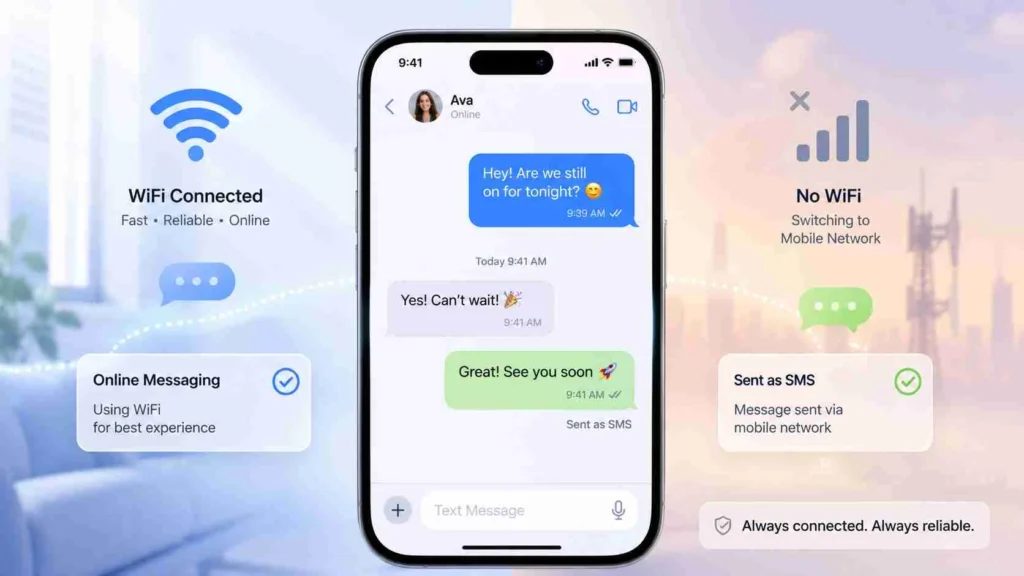
Sent as SMS means a message that was delivered using the traditional Short Message Service (SMS) instead of internet-based messaging apps like WhatsApp, iMessage, or Messenger. It indicates that your message was sent through your mobile carrier’s text messaging system, often due to no internet connection or fallback delivery settings.
If you’ve ever sent a message on WhatsApp, iMessage, or any modern chat app and suddenly noticed the label “Sent as SMS,” you might have wondered what just happened. Did your message switch apps? Did it fail? Or is it something technical?
The truth is simple but important.
“Sent as SMS” is your phone’s way of telling you that your message was delivered through your mobile network’s basic texting system instead of the internet.
In today’s world of instant messaging apps, SMS might feel old school, but it still plays a powerful backup role when internet-based messaging is unavailable.
Let’s break it down in detail.
What Does Sent as SMS Mean in Simple Words?
When your message shows sent as SMS, it means:
Your message was not sent through an app like WhatsApp or iMessage using data or WiFi. Instead, it was sent as a standard text message through your mobile carrier.
In simple terms:
It switched from internet messaging to mobile network messaging automatically.
Origin and Evolution of SMS
To understand “sent as SMS,” it helps to know where SMS comes from.
SMS, or Short Message Service, was introduced in the early 1990s as part of mobile communication systems. Before internet messaging apps existed, SMS was the only way to send text messages on phones.
Key points about SMS history:
- Introduced in early mobile GSM networks
- Limited to 160 characters per message
- Works without internet connection
- Still supported by all mobile phones globally
Even though apps like WhatsApp and Telegram dominate now, SMS remains essential for backup communication, verification codes, and emergency messaging.
Why Your Message Gets Sent as SMS
There are several reasons your phone may switch to SMS automatically.
Common reasons:
- No internet connection available
- Weak or unstable WiFi or mobile data
- Recipient does not use the same messaging app
- iMessage or chat services temporarily unavailable
- Settings enabled for SMS fallback
Real World Examples of Sent as SMS
Here are practical situations where you might see this message:
Example 1: No Internet
You type a WhatsApp message, but your WiFi drops. The app sends it as SMS instead.
Example 2: iMessage Fallback
On iPhone, if iMessage fails, your message automatically becomes SMS.
Example 3: Recipient Not Online
Some apps switch to SMS if the receiver cannot be reached through the internet service.
Tone and Meaning in Different Contexts
The phrase “sent as SMS” is neutral and technical, but the situation can feel different depending on context.
Friendly tone example:
“Hey, I sent it as SMS because your internet was off 😊”
Neutral tone example:
“Message sent as SMS due to network unavailability.”
Slightly negative interpretation:
Some users may think:
- “Did my app fail?”
- “Will I be charged extra?”
- “Did it send correctly?”
But usually, it simply means fallback delivery worked.
Comparison: SMS vs Internet Messaging
Here is a clear comparison to help you understand the difference.
Table 1: SMS vs Internet Messaging
| Feature | SMS | Internet Messaging |
|---|---|---|
| Requires internet | No | Yes |
| Cost | May charge per message | Usually free |
| Speed | Fast but basic | Very fast |
| Media support | Limited | Photos, videos, files |
| Apps used | Default messaging app | WhatsApp, iMessage, Telegram |
How “Sent as SMS” Works Behind the Scenes
When your phone detects that internet messaging is not possible, it automatically routes your message through your carrier network.
Process:
- You type a message
- App tries internet delivery
- If failed, system switches to SMS
- Carrier sends message to recipient
This process is usually automatic and happens within seconds.
When Sent as SMS Is Useful
Even though it sounds outdated, SMS is still very important.
Benefits:
- Works without internet
- Reliable in rural or low-network areas
- Used for OTP and verification codes
- Emergency communication backup
Possible Charges for Sent as SMS
One important thing many users forget is cost.
Depending on your mobile plan:
- SMS may be free or limited
- International SMS may cost extra
- Messaging apps are usually free over WiFi
Always check your carrier plan if you see frequent SMS fallback.
Common Misunderstandings About Sent as SMS
Many users get confused when they see this label.
Misconceptions:
- Thinking the message failed
- Assuming it was sent manually as SMS
- Believing it bypassed privacy
- Confusing it with spam messages
Reality:
It is just an automatic delivery method change.
Alternative Terms and Related Meanings
Different phones and apps may use slightly different wording.
Table 2: Similar Terms Explained
| Term | Meaning |
|---|---|
| Sent as SMS | Message delivered via mobile network |
| Text message | Standard SMS message |
| Delivered via SMS fallback | Backup sending method |
| Green bubble message (iPhone) | SMS instead of iMessage |
Polite Alternatives You Can Use
If you want to explain it to someone clearly, you can say:
- “I sent it as a normal text message.”
- “It went through SMS because the internet was off.”
- “It was delivered via mobile text.”
- “I used SMS fallback.”
These sound more natural in conversation.
When You Should Be Careful
While SMS fallback is helpful, there are situations to watch for:
Be careful when:
- Sending sensitive information
- Messaging internationally
- Expecting multimedia files
- Using apps with strict privacy requirements
SMS is less secure compared to encrypted messaging apps.
Table 3: When to Use SMS vs Apps
| Situation | Best Option |
|---|---|
| No internet | SMS |
| Sending photos | Messaging app |
| Quick text in emergencies | SMS |
| Group chats | Messaging app |
| OTP verification | SMS |
Real Life Impact of “Sent as SMS”
This small notification actually reflects how modern communication systems are built for reliability.
Even in 2026, SMS remains a hidden backup layer ensuring your message still reaches someone no matter what.
So next time you see “sent as SMS,” it is not an error. It is a safety net working quietly in the background.
FAQs
What does sent as SMS mean on WhatsApp?
It means your WhatsApp message was sent using your mobile network instead of the internet due to connection issues or fallback settings.
Why did my iPhone message send as SMS?
It usually happens when iMessage is unavailable or the recipient does not have internet access.
Does sent as SMS mean the message failed?
No, it means the message was successfully sent using the SMS system.
Will I be charged for SMS messages?
It depends on your mobile plan. Some plans include free SMS while others charge per message.
Is SMS faster than WhatsApp?
Not usually. WhatsApp is faster when internet is strong, but SMS can be more reliable in weak network areas.
Can SMS send photos or videos?
No, standard SMS only supports text messages.
Why does my phone switch to SMS automatically?
It switches when internet messaging is not available or fails temporarily.
Is SMS safe to use?
Yes, but it is less secure than encrypted messaging apps like WhatsApp or Signal.
Conclusion
The phrase “sent as SMS” simply means your message was delivered through the traditional mobile texting system instead of an internet-based app. It usually happens when internet connectivity is weak, unavailable, or when the messaging app automatically switches to a backup method.
Understanding this helps you avoid confusion and gives you better control over your communication. While SMS may seem outdated, it remains one of the most reliable messaging systems in the world, especially as a fallback option.
In short, it is not a problem or failure, but a smart system ensuring your message still gets delivered when digital apps cannot function properly.
Discover More Related Articles:
- “YNS” Meaning in Chat & Messages: What You Should Know In 2026
- “Azizam” Meaning : Why People Use This Romantic Word In 2026
- “Deferred” Meaning in English: What You Should Know In 2026